PMWEB Integrations — Connecting Your Capital Works Ecosystem
PMWEB is built to work as a self-contained system or in conjunction with the other systems your organisation already uses. From enterprise system connectivity to project-specific applications — HKA Tech manages every integration so your data flows securely to where it needs to go.
A Platform Designed to Connect
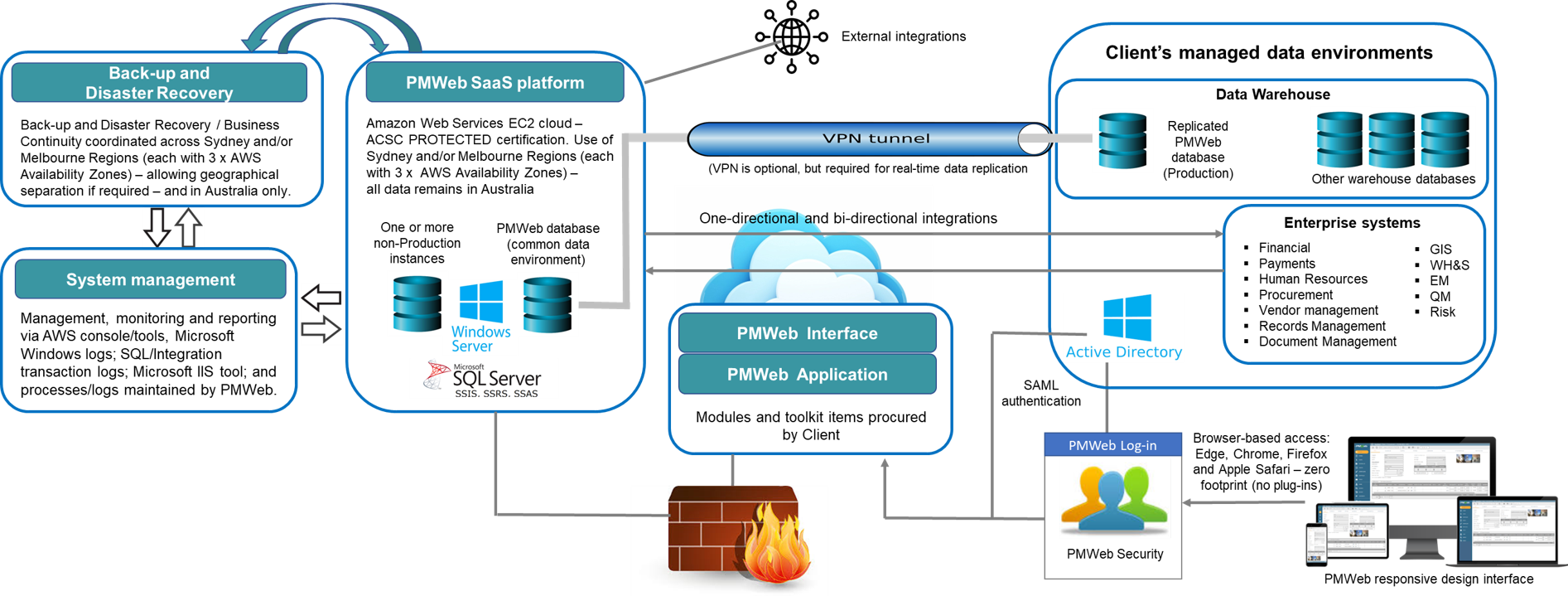
Capital works organisations rarely operate with a single system. PMWEB is designed to centralise your portfolio, program and project operations as part of your overall technology environment — exchanging data with enterprise systems such as financial, document and records management, human resources and GIS; through integrations with governance tools such as encrypted electronic signatures; to project-specific applications for enhanced project delivery. HKA Tech's integration service ensures these connections are configured, tested and securely maintained throughout your program and project lifecycle.
Integration With Enterprise Systems
PMWEB exchanges data with the enterprise systems your organisation already runs — financial, human resources, records management, GIS and Active Directory for single sign-on — along with governance tools such as encrypted electronic signatures. Business needs should drive the approach: just because an integration can be done does not mean it should be. We help you weigh each one on a cost-benefit basis.
Financial & ERP Integration
Financial system integrations are among the most common. PMWEB exchanges cost data with enterprise financial and ERP platforms to keep budgets, commitments and payments aligned with the corporate general ledger — typically through automated, scheduled data transfer.
- Purchase orders & contractsPayment instructions out of PMWEB; payment confirmations back into PMWEB.
- Vendor synchronisationKeep vendor and supplier records consistent between PMWEB and your finance system.
- Procurement managementAlign procurement activity in PMWEB with downstream financial processing.
In the vast majority of our financial integrations the PMWEB API has not been required — we integrate by automated flat-file transfer using PowerShell or SSIS. We therefore typically schedule the API as an option rather than including it in the base price.
Document & Records Management
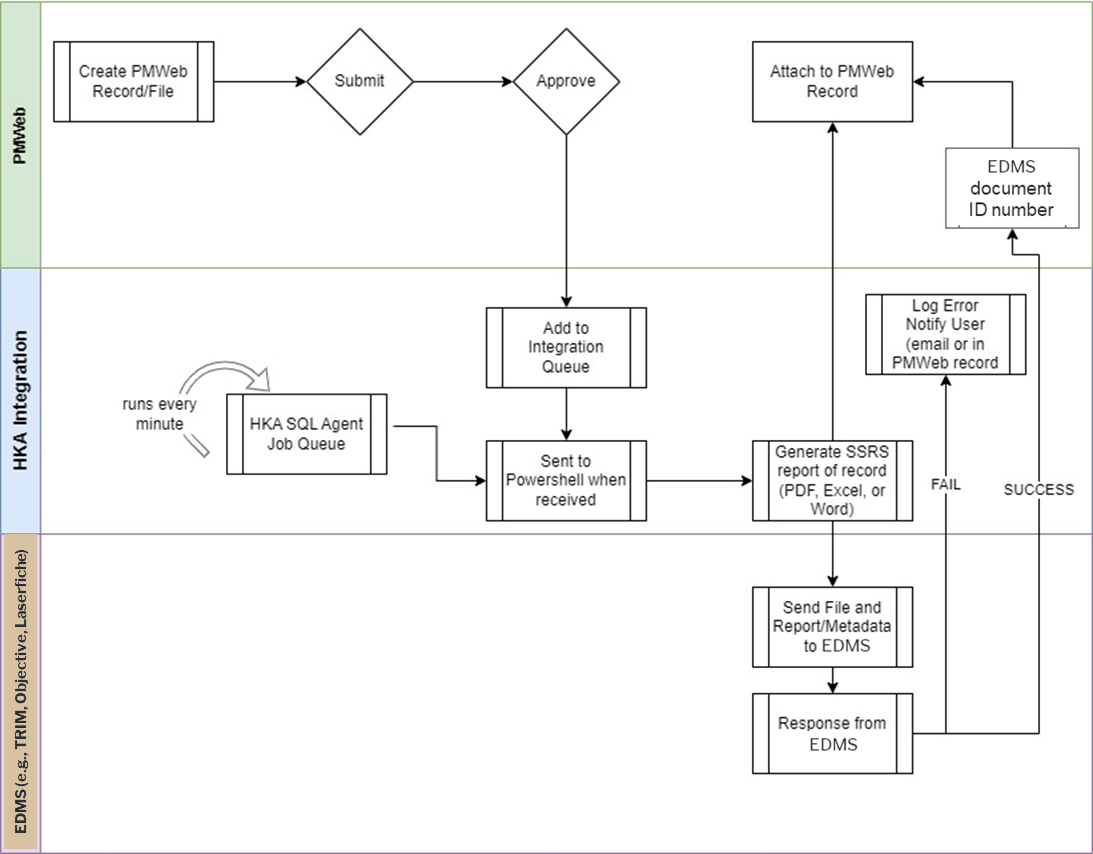
Documents can be loaded to and stored in PMWEB, where they become records in their own right — with metadata, notes, attachments and review or approval workflow; and full inclusion in PMWEB searches. Where an organisation needs to integrate with an external enterprise document or records system — to meet records, archives, privacy and freedom-of-information obligations — PMWEB supports that as well.
- Records, not just linksStored in PMWEB, documents carry metadata and move through review and approval workflow.
- One place to searchDocuments in PMWEB are searched alongside all other records, rather than a second search being needed in another system.
- External system integrationWhere required, PMWEB integrates with enterprise document and records systems such as TRIM, Objective and Laserfiche.
Data Warehouse Integration
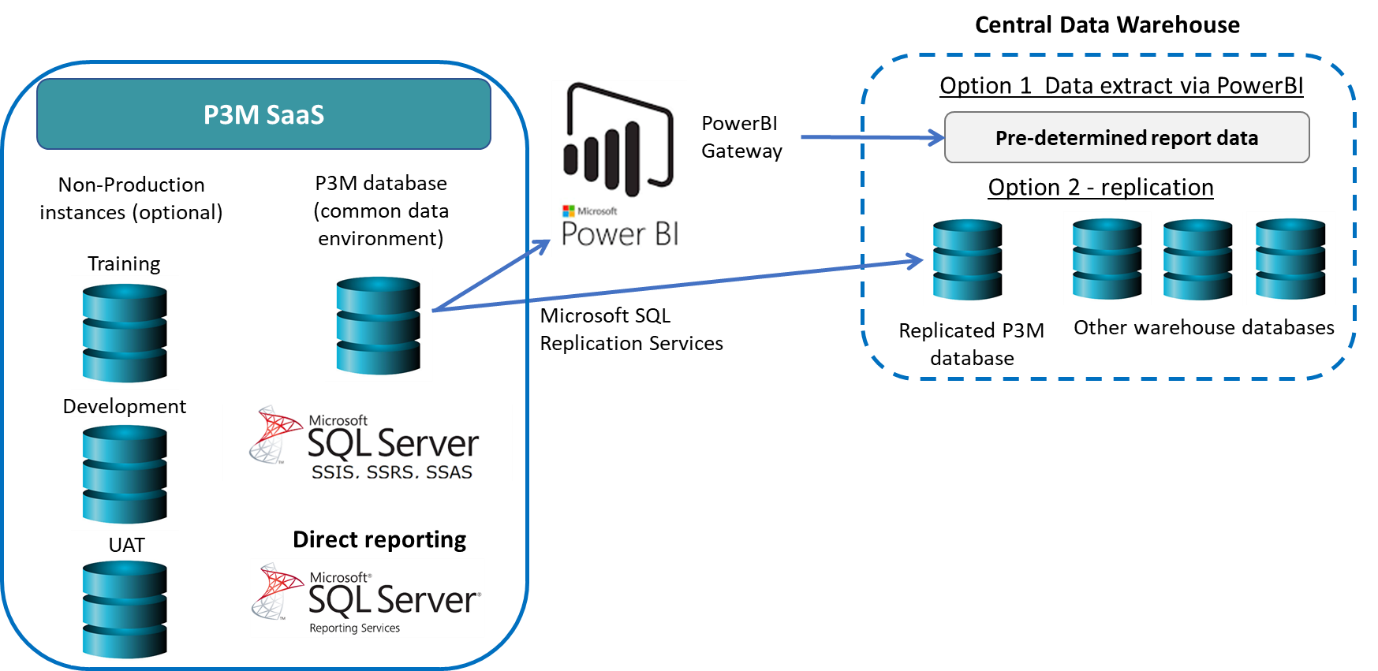
Installation of a Power BI gateway on the PMWEB server allows data nominated by the Client to be automatically exported to the Client's Data Warehouse. This is a low-cost way to ensure the Data Warehouse has current data. The frequency of the data export can be set (e.g., overnight or every few hours) and the data content can be varied when needs change.
Some Clients have active Data Warehouse teams that want to regularly change the details of data required for export. In these cases, we recommend real-time replication and can implement this a number of different ways.
GIS Integration
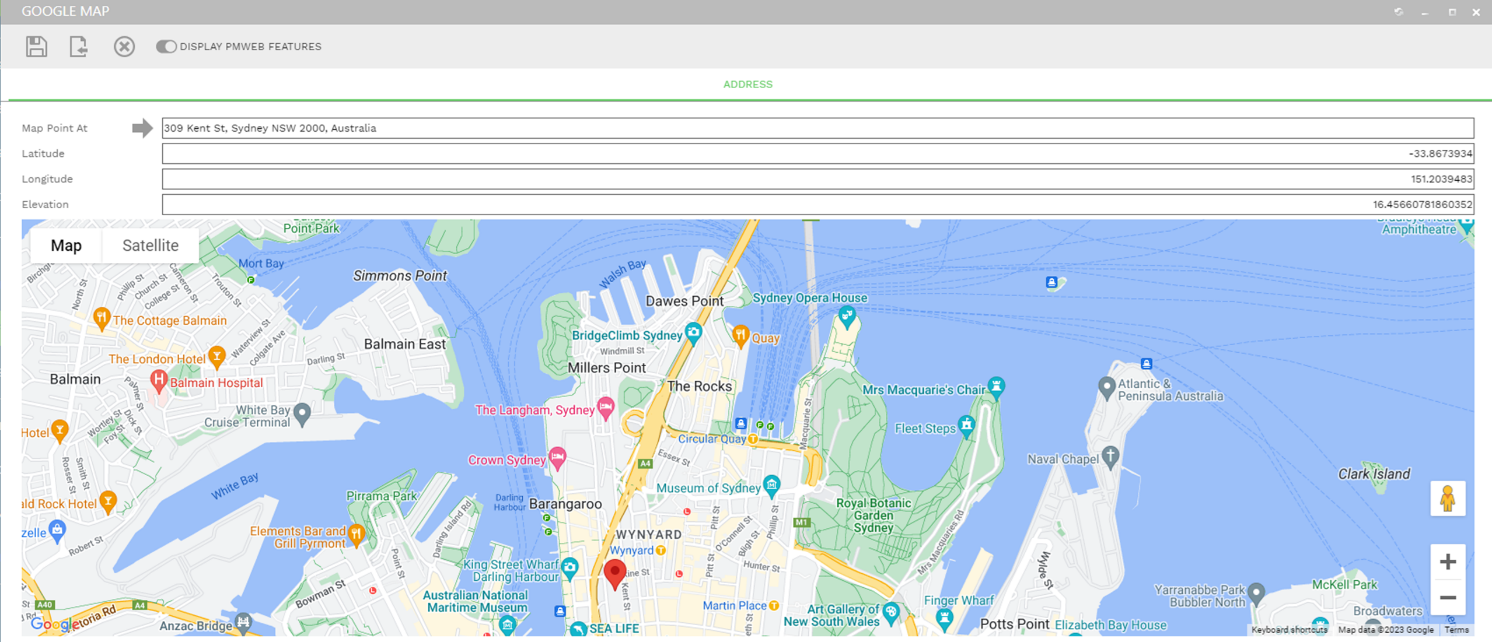
PMWEB ships with a built-in Google Maps integration for spatial tracking of projects, assets and equipment by latitude, longitude or address. Beyond that, PMWEB integrates with enterprise GIS systems such as Esri ArcGIS — project information that originates in PMWEB can flow to a layer in the GIS system, where it is often used to keep communities informed through public-facing maps.
- Native Google MapsOut-of-the-box spatial display of projects, assets and equipment.
- Esri ArcGISWe have connected PMWEB to the Esri API using PowerShell, without requiring the PMWEB API.
- Public-facing mapsLocal government authorities use PMWEB-to-GIS integration to publish up-to-date project information to ratepayers.
Keeping Communities Informed
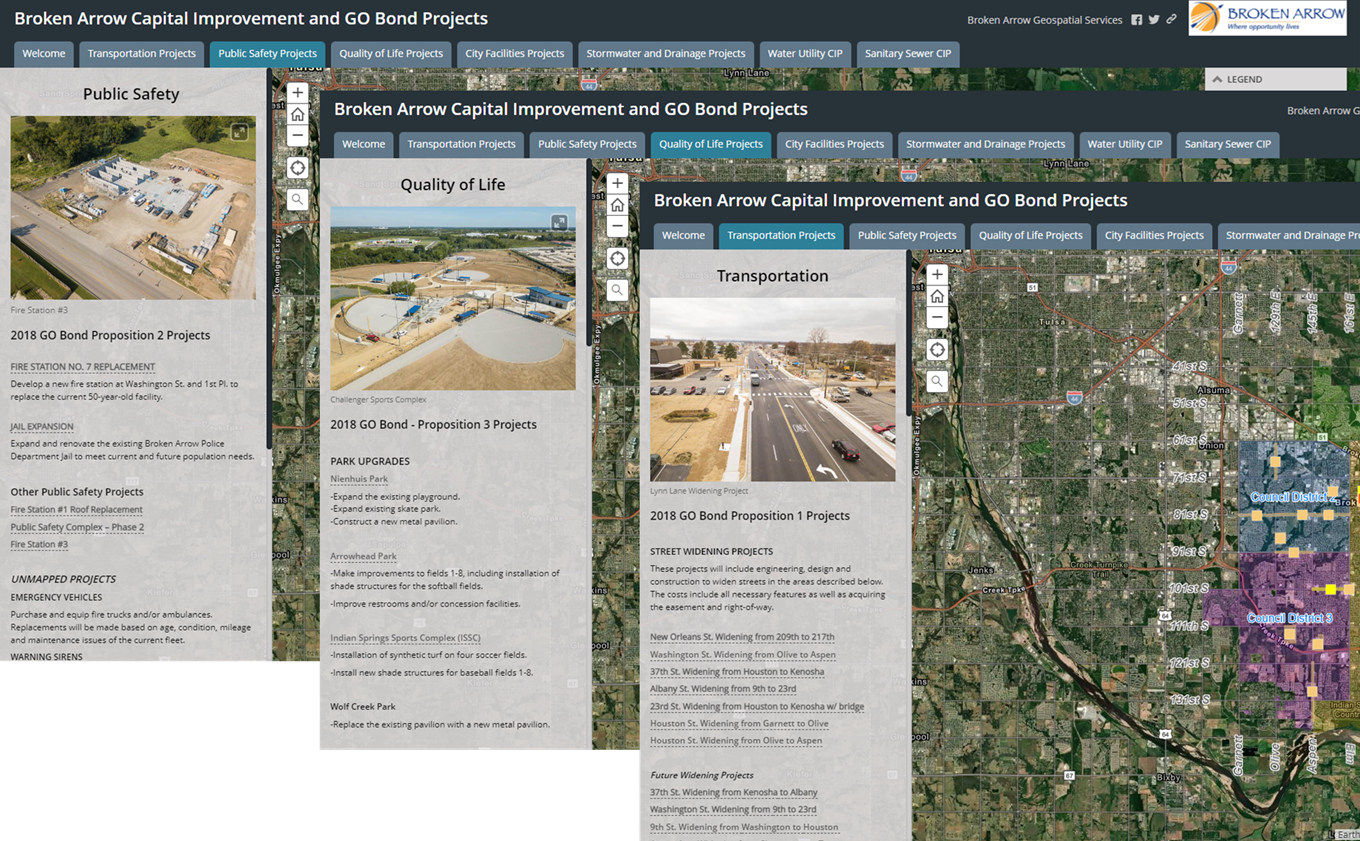
Project information captured in PMWEB can be carried across to a layer in an Esri ArcGIS system, where a local government authority builds it into a public-facing capital improvement map. Viewers click any location to see the project information — including when it was last updated — drawn straight from the PMWEB project record.
Active Directory & Single Sign-On
PMWEB integrates with Active Directory for single sign-on through two alternatives — LDAP and SAML — so users authenticate against your existing identity provider rather than a separate PMWEB credential.
- LDAPPMWEB connects to Active Directory to import users; each login is authenticated against AD in real time. Passwords are never stored in PMWEB and disabling a user in AD immediately blocks PMWEB access. LDAP users can use PMWEB multi-factor authentication.
- SAMLPMWEB's SAML integration supports multi-factor authentication and is compatible with ADFS 2.0 and 3.0 and Shibboleth identity providers (ADFS recommended). Other identity providers can be supported with additional configuration.
Rapid integration. Whether using LDAP or SAML, the integration between PMWEB and the Client system can be operating within days — even same day if the Client's IT team has the availability. Many Clients now maintain their Active Directory in a Cloud (e.g., Azure) — PMWEB integrates easily in these situations.
Encrypted Electronic Signatures
PMWEB includes out-of-the-box integration with DocuSign and Adobe Sign. Both operate through PMWEB workflow, so signature requests and completed, signed documents are captured against the relevant record as part of the approval process.
- DocuSignOptional out-of-the-box integration, workflow-driven electronic signing.
- Adobe SignAn optional integration that operates in the same manner as DocuSign.
Workflow-driven. Signature requests are raised and tracked through PMWEB workflow. A DocuSign integration brochure is available from HKA Tech on request.
Integration With Project Systems
The applications your delivery teams use day to day connect natively to PMWEB — keeping schedules, models and drawings in step with the program record. Some are built in; others are added when a project calls for them.
Microsoft Project & Primavera P6
PMWEB's scheduling tool integrates natively with Microsoft Project and Oracle Primavera P6 — the two scheduling platforms most capital works teams already run. Schedules built or maintained in either tool may be imported directly to PMWEB, so program dates, activities and progress stay aligned with cost, contract and document records in one place.
- Native, out-of-the-boxNo middleware required — the scheduling module imports Microsoft Project and Primavera P6 schedule files directly.
Other task management tools: PMWEB includes a number of other task management tools, including Stage Gates, Kanban-style Activity Boards and Checklists.
BIM
BIM is an optional toolkit integration. PMWEB's Model Manager — with the PMWEB 3D Viewer and COBie Manager — connects PMWEB to Autodesk Platform Services (formerly Forge) and Revit. BIM data can be presented as three-dimensional models, spreadsheets, relational databases and more, with tools to view, interact with and create BIM data inside the program management context.
- Autodesk Platform Services & RevitModel Manager integrates PMWEB with Autodesk Platform Services and Revit for live model access.
- 3D Viewer & COBie ManagerView models in three dimensions and manage COBie asset data for handover to operations.
- Asset handover supportModel-linked records carry design information through to the Operate and asset-management phases.
Optional toolkit integration. BIM is enabled when a project calls for it. Clients procure Autodesk Platform Services separately. A PMWEB BIM integration brochure is available from HKA Tech on request.
Bluebeam
The PMWEB Bluebeam integration lets users select one or more PDF files in Document Manager or an Attachments tab and launch a Bluebeam Studio review session. Markups and comments from the Studio session flow back to PMWEB and the marked-up PDFs are saved back to PMWEB when the session closes — so review and markup stay inside the project record.
- Launch from PMWEBStart a Bluebeam Studio session directly from a PDF in Document Manager or an Attachments tab.
- Markups return automaticallyComments and markups from the Studio session are sent back to PMWEB.
- Marked-up files saved backThe marked-up PDF is saved to PMWEB when the Studio session is closed.
Optional toolkit integration. A PMWEB Bluebeam integration brochure is available from HKA Tech on request.
Choosing the Right Integration Method
The method we use depends on the type of data; how often and in which direction it moves; and the flexibility of the systems involved. PowerShell is our most common approach for enterprise system integration — but every option carries a cost, so we explore each on a cost-benefit basis with you.
Microsoft PowerShell Most common
HKA Tech's preferred method for enterprise system integration. PowerShell runs directly on the PMWEB server with full data-transformation and table-manipulation capability, handling many data formats and external APIs. SQL Server Agent schedules PowerShell actions on system events or timers. Most complex integration needs are met this way.
SQL Server (SSIS / SSRS)
Out-of-the-box Microsoft SQL Server tooling. SQL Server Integration Services moves data on a schedule; SQL Server Reporting Services handles one-way exports. Used alongside PowerShell as part of HKA Tech's preferred integration approach.
PMWEB Integration Manager
Out-of-the-box integration with Microsoft Excel, including field mapping for data exchange. Scoped to the modules within the tool and requires specifically formatted Excel data.
Microsoft Excel
Import and export Excel files through the user interface on individual record types, with on-the-fly field mapping. HKA Tech's PMWEB Admin tools optionally allow bulk Excel import and export across a number of record types.
SFTP
PMWEB supports setting up an SFTP site for secure file exchange. FTP is theoretically available but is not recommended for security reasons.
PMWEB API Rarely needed
Standard REST and SOAP interfaces are available for most PMWEB modules, and require middleware (such as MuleSoft, Dell Boomi AtomSphere and Microsoft Power Automate) with which to communicate. The API is rarely required in practice — but it is available, which matters to some IT teams. The need for it is driven by an organisation's detailed IT requirements, so we typically schedule it as an option.
We always recommend looking closely at the options. Just because an integration can be done does not mean it should be — every option carries a cost that may or may not be warranted by the value it delivers. Business needs should drive the approach, and each alternative is best explored on a cost-benefit basis.
Ready to Connect PMWEB to Your Environment?
Talk to HKA Tech about your integration requirements — from enterprise to project-specific applications and custom development. We'll help you map the right approach for your program.